TL;DR: Moving from POTS to cloud communications, whether you’re getting ahead of the shutdown or responding to a carrier’s notice, happens in four phases: evaluating providers, porting and provisioning numbers, testing and cutting over, and training your team after go-live. Most migrations take 30 to 90 days, depending on line count and how many systems still run on copper.
In this post:
- What does the move from POTS to cloud communications actually involve?
- What should you look for in a cloud communications provider?
- How does number porting and provisioning actually work?
- What does cutover day look like, and how do you avoid downtime?
- How do you get your team ready to adopt the new system?
Carriers across the country are retiring POTS (plain old telephone service) lines, the copper network that’s carried analog business phone calls for decades. Some businesses are moving proactively, ahead of any notice. Others are moving because a notice already arrived, with a firm disconnection date attached. Either way, once it’s time to leave copper behind, the question that matters most is how the move to cloud communications actually happens. (For the regulatory background on why this is happening now, see our overview of the POTS lines shutdown.)
This post covers the mechanics of the move itself. A POTS-to-cloud migration isn’t one cutover event. It’s four connected phases: evaluating providers, porting and provisioning numbers, testing and cutting over, and training your team to use the new system. Skipping a phase, or rushing through it under deadline pressure, is where most migration problems start. Here’s what each phase involves and how to move through them without losing a business day of phone service.
What Does the Move From POTS to Cloud Communications Actually Involve?
A POTS-to-cloud migration moves through four phases: provider evaluation, number porting and provisioning, testing and cutover, and team training. Each phase depends on the one before it, so working out of order tends to create rework later.
Treat the migration as four connected phases, not one weekend project.
Provider evaluation comes first because it shapes every decision after it: which numbers can port, what hardware you’ll need, and how life-safety lines get replaced. Porting and provisioning follow once a provider is selected, moving your numbers and setting up your new cloud phone system in parallel with your existing copper lines. Testing and cutover come next, confirming call quality, routing, and emergency calling before the old lines go dark. Training closes the loop, since a technically successful migration still fails if employees don’t know how to use the new system.
Most businesses underestimate how much of this work happens before the actual switch. A well-run migration spends more time on evaluation and provisioning than on cutover day itself. That sequencing is also why timelines vary so widely: a five-line office might complete all four phases in a few weeks, while a multi-location business with alarm panels and elevator lines on copper should plan for closer to 90 days.
What Should You Look For in a Cloud Communications Provider?
Look for a provider with a clear uptime commitment, documented e911 compliance, and a specific plan for replacing life-safety lines, not just standard voice service.
A provider that treats fire alarms and elevator phones as an afterthought will make you find that out during an emergency, not before one.
Reliability comes first: ask for the provider’s published uptime SLA and how outages are communicated, not just how they’re prevented. E911 compliance matters because cloud systems handle location data differently than copper lines did, and the provider should explain exactly how a call routes to first responders from each of your addresses. For life-safety lines specifically, ask whether the provider has a dedicated POTS replacement solution built for fire, security, and elevator systems, rather than a generic voice line repurposed for the job.
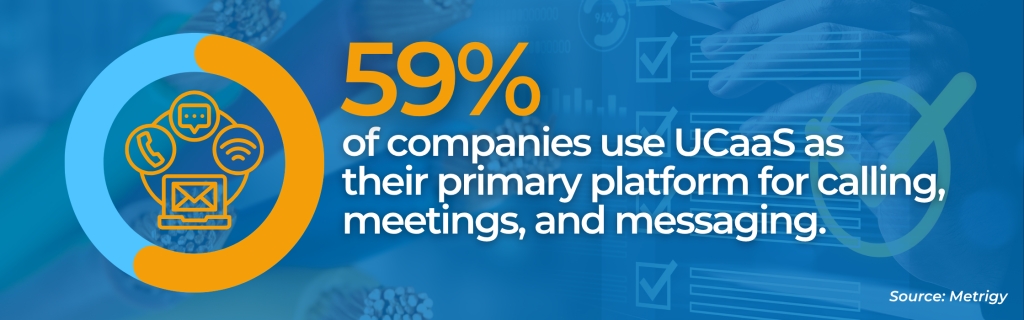
Integration and support round out the list. Confirm the platform connects to the business tools your team already uses, and ask what support looks like during the migration itself, not just after go-live. Businesses that make the move tend to see it pay off: Metrigy’s 2026 research found that nearly six in ten companies now run cloud communications as their primary calling and collaboration platform, with analysts pointing to real productivity gains, not just lower costs, as the reason adoption keeps climbing.
How Does Number Porting and Provisioning Actually Work?
Number porting moves your existing phone numbers to your new provider through a formal request called a Letter of Authorization, then activates them on the new platform once the losing carrier releases them.
Porting a phone number is usually the slowest step in the entire migration, not the fastest.
The process starts with a Letter of Authorization, a signed document giving your new provider permission to request your numbers from your current carrier. From there, business number ports commonly take one to four weeks, depending on carrier responsiveness and how many numbers are involved. Mismatched account details, such as an address or account name that doesn’t exactly match the carrier’s records, are the most common cause of delay.
Provisioning happens alongside porting: your new provider sets up extensions, call routing, and devices on the cloud platform before your numbers officially transfer. Running both systems in parallel during this window lets you test the new setup without disrupting the phone service your business depends on right now. Numbers that connect to fax lines, alarm monitoring, or other non-human systems often need separate attention here, since those connections don’t always port and provision the same way a standard desk phone does.
What Does Cutover Day Look Like, and How Do You Avoid Downtime?
Cutover day is when call traffic actually switches from your old POTS lines to your new cloud platform, and it goes smoothest when it’s staged and tested rather than flipped all at once.
The businesses that avoid downtime are the ones that test everything before cutover day, not during it.
Before cutover, run test calls in both directions, confirm caller ID displays correctly, and verify that emergency calls route to the right location. Staging the cutover by location or line group, rather than switching every line simultaneously, limits how much is exposed if something doesn’t work as expected. It’s also worth confirming with your provider what the rollback plan looks like: how quickly you could revert to copper if a critical issue surfaces in the first few hours.
If a carrier’s notice has already set a deadline, that deadline doesn’t change what needs to happen before cutover, it just compresses how much time there is to do it. A shorter window is a reason to prioritize testing on your highest-risk lines first, not a reason to skip testing altogether. Businesses moving proactively, without a notice forcing the date, have more room to sequence this deliberately, but the same testing steps still apply.
How Do You Get Your Team Ready to Adopt the New System?
Getting your team ready means training on the specific tasks people do daily, documenting who to contact with issues, and collecting feedback in the first few weeks after go-live.
A migration that goes technically well can still fail if nobody on your team knows how to transfer a call.
Short, task-specific training beats a single long overview session. Show employees how to do the handful of things they actually do every day, like transferring calls or checking voicemail, rather than walking through every feature the platform offers. Pair that with simple written documentation they can reference later, since not everyone will remember a training session word for word.
Naming an internal point of contact for questions in the first two weeks after go-live matters just as much as the training itself. That person can field small issues before they turn into larger frustrations, and can flag patterns back to your provider if the same question keeps coming up. Built-in feedback loops during this window help you catch adoption gaps early, while they’re still easy to fix.
Ready to Move Off Copper?
Whatever your current POTS lines connect to, Crexendo VIP can help you plan and execute the move to cloud communications without guessing at the details.
FAQ
Most migrations take 30 to 90 days from provider selection to full cutover. Smaller offices with few lines can move faster; businesses with multiple locations or life-safety systems on copper should plan for the longer end of that range.
No. Existing numbers typically port to the new provider through a Letter of Authorization process, so your business keeps the same numbers customers already know.
Not always. Many cloud phone systems support existing desk phones, or offer softphone apps that work on computers and mobile devices, so hardware needs depend on your provider and preferences.
These life-safety lines need dedicated replacement devices built to emulate analog signals, not a standard voice line. Confirm your provider has a specific plan for these systems before cutover, not after.
Yes. Staging cutover by location or line group is a common way to limit risk and catch issues on a smaller scale before moving the rest of your lines.